

How the investigation works.
My Media Forensics examines your WordPress Media Library, checks supported sources for references, and organizes the evidence into clear usage classifications you can investigate.

The Investigation Process
Four steps to go from files to findings.
Every investigation follows a structured process, from establishing the media inventory to presenting the evidence behind each finding.

Index Your Media
Files registered in your WordPress Media Library are indexed, capturing their details and establishing the inventory for investigation.

Detect References
Supported WordPress content and integrations are checked for attachment IDs, image blocks, media URLs, and other recognized references.

Evaluate the Evidence
Detected references are evaluated and classified as confirmed or potential usage. Files without detected references are identified separately.

Review the Findings
Explore the results, examine detected references, and follow links to associated content for further investigation.
Understanding Media Attachments
Unattached doesn’t mean unused.
WordPress’s Attached/Unattached status only identifies an attachment’s relationship to a parent post. It doesn’t tell you everywhere that file is being used.
An image marked as Unattached may still appear on multiple pages, serve as a featured image, or be referenced elsewhere on your site. Likewise, an attached file isn’t necessarily being used in the content it’s associated with.
My Media Forensics goes beyond this limited relationship by examining supported WordPress content and integrations to identify actual media references.
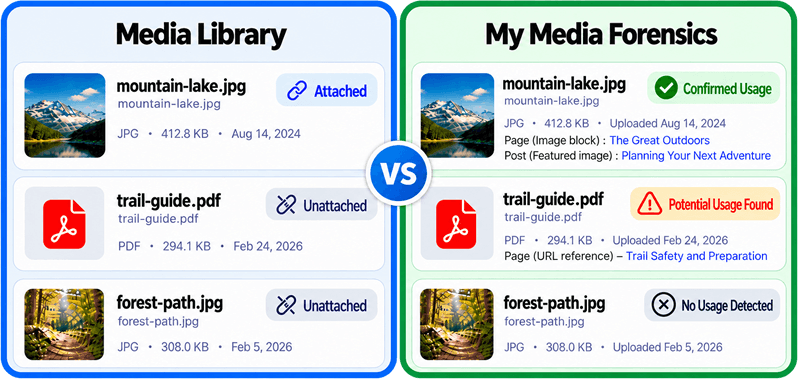
The Media Library shows whether a file has an attachment relationship,
but not the full usage picture.
How references are evaluated
How the evidence shapes each finding.
Each detected reference is evaluated according to the evidence available. The resulting classification reflects what the investigation can establish, what may require closer examination, and where no supported references were found.
Confirmed Usage
A supported detector identifies a recognized media relationship, such as an image block, featured image, or other supported reference. The plugin shows where the file is being used.

Potential Usage
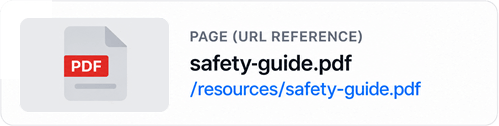
Evidence suggests a file may be in use, such as a direct media URL found in content or a reference in a theme file. These findings require further investigation.
No Usage Detected
No references were identified within the supported detection coverage. The file may still be used in unsupported locations, so this does not mean it’s unused or safe to delete.

Understanding detection limitations
Every investigation has its boundaries.
My Media Forensics follows the evidence available within supported WordPress content and integrations. Its findings help establish where media is referenced, but some usage may exist beyond the scope of the investigation.

No detected references does not mean a file is unused. When no references are detected, it means none were identified within the investigation’s supported coverage. Always review the available evidence before deciding whether a file can be removed.
What affects detection coverage?
Sources Examined
The investigation checks supported WordPress content and integrations. Coverage varies by plugin edition, with Pro extending detection into additional content sources.
Reference Methods
Media can be referenced through attachment IDs, file URLs, and other relationships. The plugin recognizes supported reference patterns, but not every implementation can be identified.
Outside the Investigation
References generated dynamically, managed through unsupported integrations, or used outside WordPress may not be detected.